
How T.A. McCann Built an AI Executive Assistant
TLDR: TA McCann, sixth-time founder and Seattle VC, let go of his human EA after 10+ years and built Scout instead. It’s been 4 months Scout manages his busy schedule as well as his EA did!
At PSL, we are geeks, about productivity. This year, with AI agents in the scene, we burnt an abnormal amount of time catching up on "cool workflows" over our Wednesday lunches. As the markets for AI agents matured, we've come to believe that productivity is not a technical problem; it is a clarity problem. Figure out what you want to automate, and the solution can be as simple as a Claude project with a few markdown files.
While you mull over what you can automate, we will share with you how TA McCann, a six-time founder, CEO of Lev, and Seattle VC at Pioneer Square Labs, saved $2.5k each month by replacing his fractional human EA with Scout, an AI assistant he built in a few hours. TA has been using Scout for four months now. We asked how it worked for him and he shrugged, "There are some things I miss, but not much". Scout lives on his phone as a Claude project. So TA can talk to Scout as he sips his morning coffee.
If you have a $20 Claude subscription and half an afternoon, read on to learn how you can build your own Scout. If you have the subscription but not the time, skip to the end to get a copy of Scout for yourself.
Build your Butler
To build an EA, all you need is a Claude Project with three parts: skills that bake in your expertise, a commands file that lists your regular workflows, and instructions that give Scout its identity. Together with Claude's in-built memory, you get a system that does stuff, learns your context and gets sharper. The best part is, every rule is a file you can open, read and refine. The only exception is the memory; you can guide what goes in and stays out, but you can't directly edit the file.
Skills: The Expertise Roster
Start by creating a new Claude project and giving it a name you'd like to call it. TA went with Scout. Once you have an empty project, start by adding skills. List what you do regularly and want off your plate: keeping up with contacts, planning trips, booking events. Each one becomes a skill.
A skill is a simple text file you can create on Google Docs and export as .md file. Inside each skill, answer four questions. What does it do? When does it fire? What does it hand back? How does it learn? That last one matters most. It keeps Scout's memory clean by specifying what to save and what to delete. Your first skills will be rough. Write them anyway; you'll sharpen them as time goes.
To properly manage your life, Scout will need access to external tools. When building a skill, think about how you work across different tools. When describing a skill, mention the tools the skill will use. For example, to prepare his morning brief, the Foreman skill needs access to TA's email, Slack and Linear. Navigate to Claude's settings to add these as connectors.
TA currently has 11 skills in Scout. The Foreman skill reads his dev environment and email, and writes a structured brief. The Whisper skill looks up anyone TA is meeting and surfaces relevant background information. The Biographer skill captures his personal context so those who meet him succinctly understand his background and priorities. The Keepsake skill keeps a gift list for everyone in the network. The Date Night skill scours what's happening in Seattle and plans sushi dates and movie nights with his wife.
Once you have your skills, add them to the project's context, each skill as a single file. Start with a few, and add more as you need. We love the idea of creating one master skill with our rubric for creating new skills. When TA went through an acquisition, he described what he needed and asked Claude to build a new skill called Conductor. "Acquisitions are a huge pain, keeping everybody aligned," TA explained. "I could teach Scout to manage it for me in minutes."
.png)
Commands: The Calling Bell
Next, we have the commands. Think of commands as catchphrases that tell Scout when to kick off a workflow, and which skill runs it. Commands live in a single .md file. Some commands leverage Claude’s capabilities and some leverage TA’s skills. They don't have to be exact; they just have to convey intention. Create a command called "remember" that tells Scout to files a fact to memory. Next time you say, "can you jot that down?" Scout will fire the command to remember.
.png)
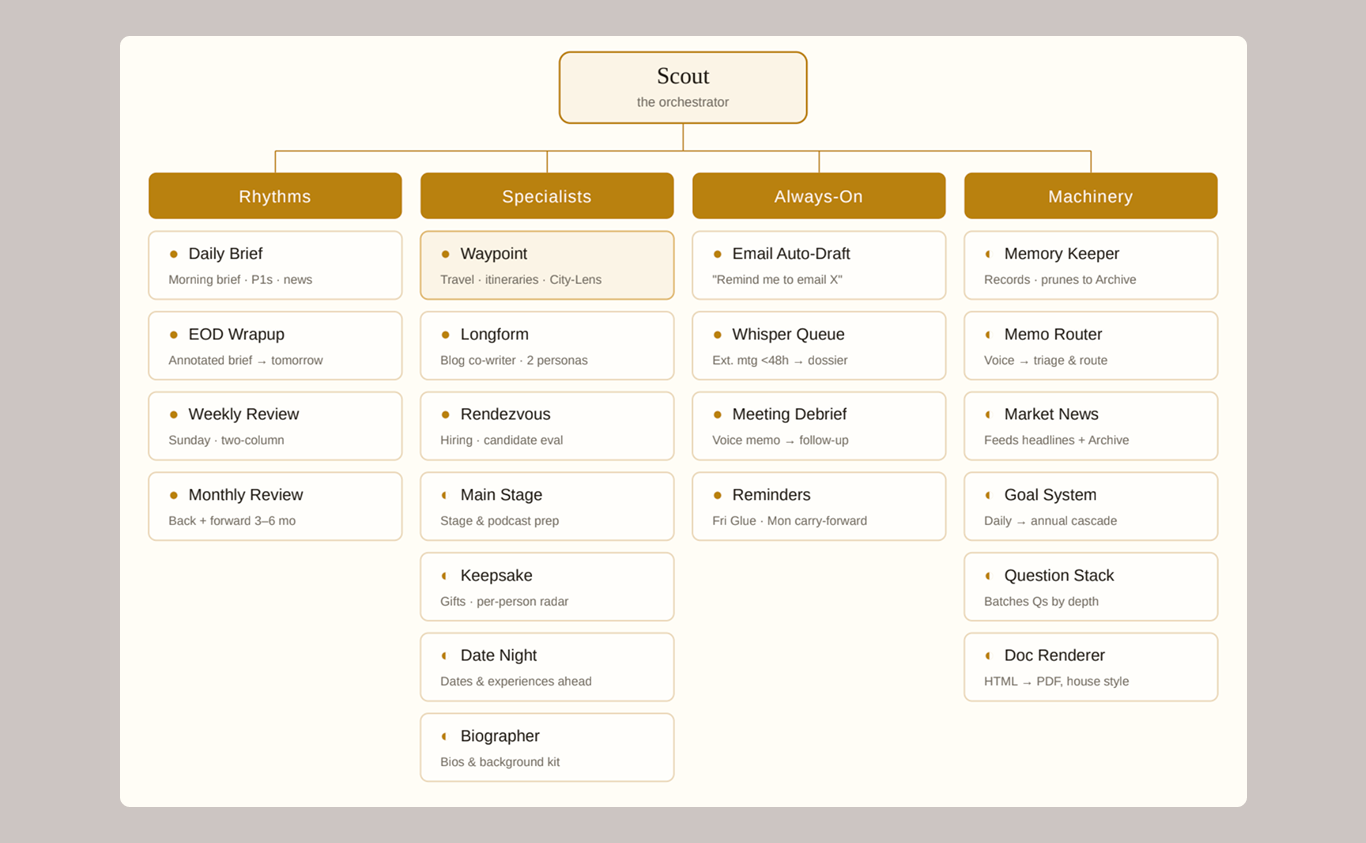
TA has categorized his commands by when he would use them. Some commands run on set rhythm; some use his specialist skills to run on demand; some are always on, working in the background; some keep the machinery working well by managing memory, priorities and goals.
.png)
Once you have a command file, add that to the Claude project's context as well.
Instructions: The House Rules
Once you have the parts ready, it is time to tie them together. Navigate to the project's instruction window and add in a few master rules. Scout will read these rules in every turn of the conversation. Skills and commands only come out when a job calls for them.
Your instructions need four things: an identity, a few key behaviors, the team, and the daily rhythms. Start with the identity. Assign Scout the role of an AI chief off staff who will manage a team of specialists under the hood. Then specify important behaviors. TA asked it to learn the owner over time, always ask for permission before sending drafts, and create documents in house style. As you work with Scout, you can come back and add more quirks. Next, introduce it to the skills it will manage. A quick list with a one line description for each is plenty. Finally specify the common workflows. Since all of Scout's workflow lives in one document (commands.md), it is enough to point it towards that file.
.png)
With this, you have hired your own AI Executive Assistant!
Training your Butler
There's a certain dopamine rush in standing up Scout in an afternoon; but we hate to say, this is only the start. The real deal is to use it every day and train it to know you.
TA has a daily ritual with Scout. Every morning, Scout hands TA a brief: updates from his team, the day's meetings with background on who he's seeing, and what he needs to focus on. TA prints the brief and carries it into his meetings, circling, striking and filling the margin with notes as his day goes. By evening, the paper is blotched with the outcome of his quarterly board meeting, questions to discuss with his team, and the email from last week Scout missed in its update. He then photographs the pages and sends it back to Scout. Each night's corrections teaches it more about his life: which connections matter, what to bring up and when. Ask a Chatbot to look up Matt Doe and it would bring his LinkedIn; Ask Scout and it will surface their conversation from 2 months back, point to their common involvement at Pioneer Square Labs and bring up just what matters to TA.
You may not need to print out a brief each morning, but spend 10 mins with Scout daily, sharing your day.
Borrow Scout
TA will share Scout’s “source code” (11 skills, the commands file and the instructions) with you if you email Tam@psl.com to request a copy for yourself. You probably don't need TA's date nights or his acquisition, but create a copy of Scout and start frankensteining it. Change its identity, replace the skills and add new commands. Think honestly about what you do regularly, how you do it, and how much you'd happily hand off. If you get stuck finding your flows, borrow from TA McCann, Brad Feld, Daniel Miessler and other stalwarts known for getting things done.
Call us geeks, but we love getting weight off our shoulders and into .md files. When you get back to work on Monday morning, we hope that a lot of your work is done by Scout so you can sip your coffee a little slower.
About T.A. McCann
T.A. McCann is a serial entrepreneur who founded and led Senosis (acquired by Google), Gist (acquired by BlackBerry) and Rival IQ, a marketing analytics company. After eight years as a managing director at Pioneer Square Labs, he is now CEO of Lev, an AI co-founder for early-stage founders that PSL spun out as its own company.
About Sahana Narendran
Sahana Narendran is a founding member of Lev, an MS HCDE student at the University of Washington, and a writer for the PSL blog. She builds AI agents, tools and workflows that multiply what people can get done, and she is curious about exploring new ways for humans and AI to work together.